
Documentation
Introduction
Use bookable products to your storefront. Use our extension to offer (simple) rental & reservation services.
Module
Extension-Name: enobis/module-booking
Latest Version: 1.6.*
Features
Frontend
Availability Calendar
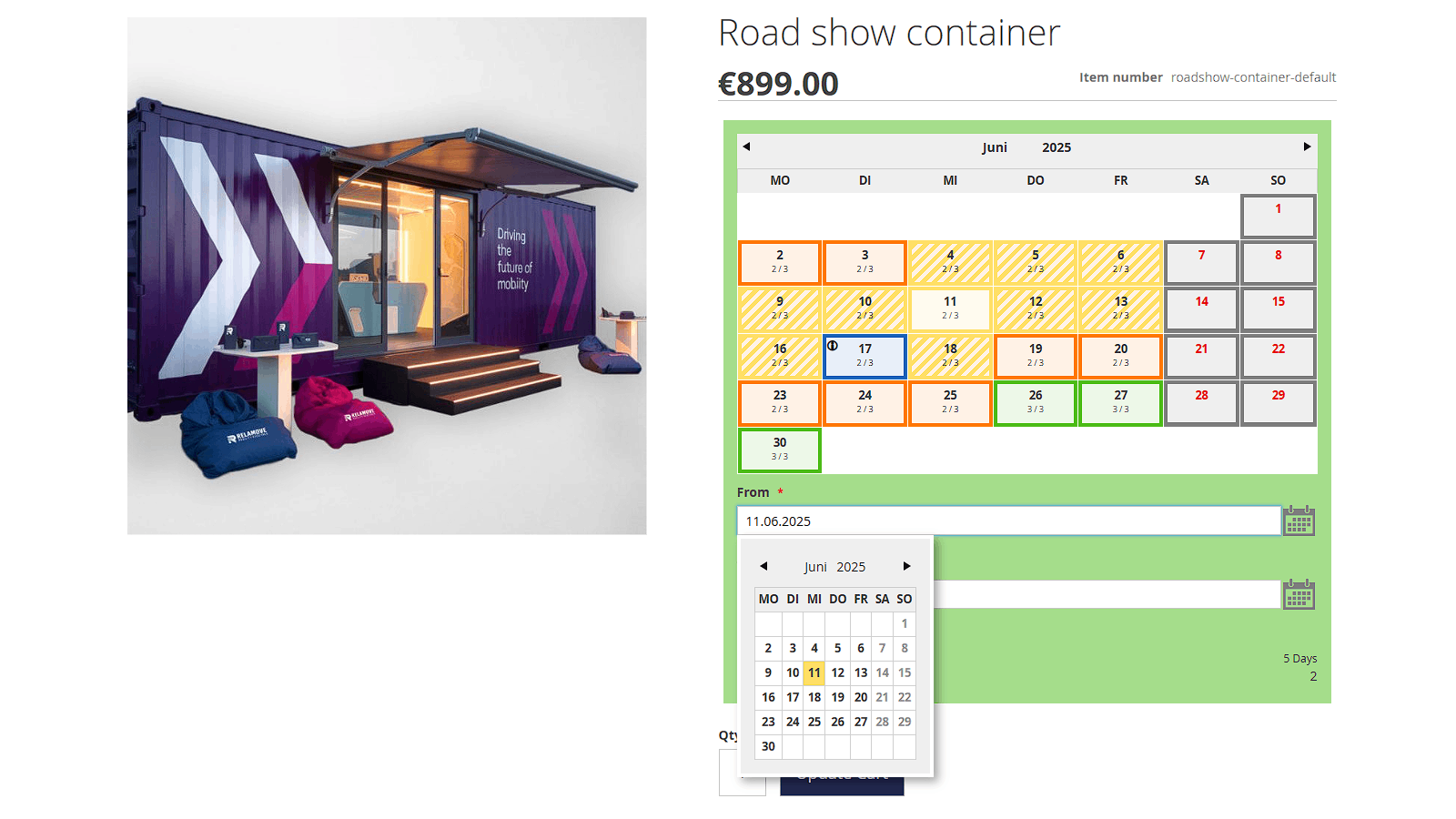
The heart of the extension is the integrated availability calendar.
The availability calendar combines different information into one visualization. It shows:
-
days of selected month
-
available quantity of product per day incl. colorful, percentage based visualisation (green: high availability, orange: medium availability, red: low availability ) - see also calculation of availability
-
restricted days (gray)
-
special days (blue incl. tooltip)
-
selected days (yellow with white background)
-
period of restriction before and after (hatched yellow) - optional, see also periods of restriction
-
Max. rental period (if restricted)
-
Max. availablity based on selected from/ to days
Calculation of availability
Availability (on a daily basis) is always calculated on the basis of a product's stock level. Availability is calculated dynamically depending on the quantities ordered per day.
Important: The stock management has to be active! A valid Stock (>=1) must be entered!
Periods of restriction
The calendar takes into account lead and lag times in addition to the actual rental period. The periods of restriction are optional and are usually used for products with the necessarity reprocessing/ recycling before/after they could be rented again. These days are taken into account for the calculation of the availability.
General availability of a product
The availability of a products can be restricted generally by:
-
stock availability: If the stock is 0, the product is not available in general
-
restricted booking from / to: Period of days in which the bookable product is available
-
restricted days: restricted days like weekends etc. are not selectable for booking
-
max rental period: max. period of days for booking
Different types of pricing
-
Fixed Pricing (Default): The price of the product applies regardless of the length of the rental period
-
Per Days: The price of the product depends on the length of the rental period. The pricing includes also customizable options.
-
Per Days (Customizable Options separately) Work in Progress
Backend
Booking Management
The "booking"-extension offers some simple tools to manage booking order from the backend.
Sales->Booking Order Items
The "Booking Order Items"-Grid gives a compact view on all ordered bookable products. It shows
-
Increment_Id: Increment_Id of order which contains the bookable product
-
Order_Status: Status of Order
-
Purchase Point
-
Purchase Date
-
Product_Id
-
Product_Name
-
Product_Sku
-
Qty_Orderd
-
Qty_Canceled
-
Qty_Shipped
-
Booking_Start_Date: Beginn of Event
-
Booking_End_Date: End of Event
-
Booking_Restriction_Start_Date: Start of the preparation phase (Before)
-
Booking_Restriction_End_Date: End of the preparation phase (After)
Sales->Order-Details
It's possible to edit the booking dates from the backend, even without canceling the order!
Important You need to calculate the availability of each product manually!
Configuration
General Configuration
Stores->Configuration->Enobis->Quota->General
| Option | Type | Description | Scope |
| :--| :-- | :-- | :-- |
| Period of restriction before (in days) | Int | Amount of days which are added to the booking start date in order to calculate the availability | Global, Product |
| Period of restriction after (in days) | Int | Amount of days which are added to the booking end date in order to calculate the availability | Global, Product |
| Show period of restriction in the calendar | Yes, No(Default) | Show/ Hide period of restriction visualisation in calendar | Global |
| Disable Calendar from today (in days) | Int | Disables the possibility to select a booking day earlier than today + days (usually min. period of restriction before) | Global, Product |
| Fixed Restriction Days (like weekends,holidays ...) | String | Valid Date Format (http://php.net/manual/de/datetime.formats.date.php) OR "1" - "7" (ISO-8601), one date per line. | Global |
| Special Days | Multi Line Control | Possibility to highlight special days in calendar. Has no impact on availability calculation! | Global |
| Percentage for low availability | Int | Percentage | Global |
| Public Event Agreement Policy | Yes, No(Default) | ??? | Global |
| Legacy Compatibility Mode | Yes, No(Default) | ??? | Global |
| Percentage for low availability | Int | Percentage of Availability per Day - if lower than, the day field will be colorer ind red | Global |
| Percentage for medium availability | Int | Percentage of Availability per Day - if lower than, the day field will be colorer ind orange. Everything above will be colored in green! | Global |
Product Configuration
Catalog->Product
| Option | Type | Description | Scope |
|---|---|---|---|
| Period of restriction before (in days) | Int | Amount of days which are added to the booking start date in order to calculate the availability | Global |
| Period of restriction after (in days) | Int | Amount of days which are added to the booking end date in order to calculate the availability | Global |
| Add restricted days to earliest bookable date | Yes, No(Default) | ??? | Global |
| Disable Calendar from today (in days) | Yes, No(Default) | Disables the possibility to select a booking day earlier than today (usually min. period of restriction before) | Global |
| Add restricted days to earliest bookable date | Yes, No(Default) | ??? | Global |
| Bookable From | Date | Startdate for general availability of product | Global |
| Bookable To | Date | Enddate for general availability of product | Global |
| Max Rental Period | Int | Max. Days for Booking | Global |
| Product Dependent Restricted Days | String | Valid Date Format (http://php.net/manual/de/datetime.formats.date.php) OR "1" - "7" (ISO-8601), one date per line. | Global |
| Shipping Carrier | Dropdown | Carrier for Product (Default, Simple) See above! | Global |
| Booking Price Type | Dropdown | Options for different price calculation. See above! | Global |
| --- Event Specific Settings --- | --- | --- | --- |
| Event One Day | Yes, No(Default) | Disables the selection of an enddate | Global |
| Event Enabled | Yes, No(Default) | ??? | Global |
| Public Event Agreement Policy | Yes, No(Default) | ??? | Global |
| Create Public Event Enabled | Yes, No(Default) | ??? | Global |
Important: The event specific settings are experimental only and deprecated! They will be removed in future!
Booking-Checkout
Extension-Name: enobis/module-booking-checkout

Version: 1.1.*
The "enobis/module-booking-checkout"-extension introduces two additinal delivery methods. Those delivery methods offers the possibility to use custom checkout forms to collect necessary booking data.
Checkout forms

The checkout forms are created by a xml-definition and support various kinds of fields:
-
textfields
-
textareas
-
date
-
dropdown
-
multiselect
-
checkbox sets
Fields could be either mandatory or optional. Pre-Assignment of booking dates is also possible.
Two delivery methods
The extension offers the possibility to use two kinds of delivery methods: Simple and Standard.
Both delivery methods have their own backend settings and can be declared at product level. If nothing is declared, the simple method will be used. Both delivery methods refer to a specific section in the form declaration. For more information see below!
Checkout fields
The form declaration must be available at
bash{you-theme-path}/Enobis_Booking_Checkout/layout/checkout_index_index.xml
Textfield
<item name="enobis_exhibition_eventname" xsi:type="array">

    <item name="component" xsi:type="string">Magento_Ui/js/form/element/abstract</item>

    <item name="label" translate="true" xsi:type="string">Name of trade fair</item>

    <item name="template" xsi:type="string">ui/form/field</item>

    <item name="elementTmpl" xsi:type="string">ui/form/element/input</item>

    <item name="validation" xsi:type="array">

        <item name="required-entry" xsi:type="string">true</item>

    </item>

    <item name="provider" xsi:type="string">checkoutProvider</item>

    <item name="dataScope" xsi:type="string">bookingCheckout.enobis_exhibition_eventname</item>

    <item name="config" xsi:type="array">

        <item name="customScope" xsi:type="string">bookingCheckout</item>

    </item>

    <item name="additionalClasses" xsi:type="string">field-100</item>

</item>
Features:
-
Mandatory field:
bash<item name="required-entry" xsi:type="string">true</item> -
Extra CSS class:
bash<item name="additionalClasses" xsi:type="string">field-100</item>
Textarea
<item name="enobis_exhibition_eventdescription" xsi:type="array">

    <item name="component" xsi:type="string">Magento_Ui/js/form/element/textarea</item>

    <item name="label" translate="true" xsi:type="string">What shall be your overall theme?</item>

    <item name="template" xsi:type="string">ui/form/field</item>

    <item name="elementTmpl" xsi:type="string">ui/form/element/textarea</item>

    <item name="validation" xsi:type="array">

        <item name="required-entry" xsi:type="string">true</item>

    </item>

    <item name="provider" xsi:type="string">checkoutProvider</item>

    <item name="dataScope" xsi:type="string">bookingCheckout.enobis_exhibition_eventdescription</item>

    <item name="config" xsi:type="array">

        <item name="customScope" xsi:type="string">bookingCheckout</item>

    </item>

    <item name="additionalClasses" xsi:type="string">field-100</item>

</item>
Date
<item name="enobis_exhibition_pickup_date" xsi:type="array">

    <item name="component" xsi:type="string">Magento_Ui/js/form/element/date</item>

    <item name="label" xsi:type="string">Date for pickup</item>

    <item name="template" xsi:type="string">ui/form/field</item>

    <item name="elementTmpl" xsi:type="string">ui/form/element/date</item>

    <item name="validation" xsi:type="array">

        <item name="required-entry" xsi:type="string">true</item>

    </item>

    <item name="provider" xsi:type="string">checkoutProvider</item>

    <item name="dataScope" xsi:type="string">bookingCheckout.enobis_exhibition_pickup_date</item>

    <item name="config" xsi:type="array">

        <item name="customScope" xsi:type="string">bookingCheckout</item>

    </item>

    <item name="additionalClasses" xsi:type="string">field-50</item>

    <item name="booking_preset" xsi:type="string">to</item>

    <item name="disabled" xsi:type="string">disabled</item>

    <item name="options" xsi:type="array">

        <item name="dateFormat" xsi:type="string">dd.MM.yy</item>

    </item>

</item>
Features:
-
Preassigned date from booking calender:
bash<item name="booking_preset" xsi:type="string">to</item> -
Disabled form element:
bash<item name="disabled" xsi:type="string">disabled</item>
Dropdown
<item name="enobis_exhibition_reason" xsi:type="array">

    <item name="component" xsi:type="string">Magento_Ui/js/form/element/select</item>

    <item name="label" xsi:type="string">What is the goal of your event with these exhibits?</item>

    <item name="template" xsi:type="string">ui/form/field</item>

    <item name="elementTmpl" xsi:type="string">ui/form/element/select</item>

    <item name="validation" xsi:type="array">

        <item name="required-entry" xsi:type="string">true</item>

    </item>

    <item name="provider" xsi:type="string">checkoutProvider</item>

    <item name="dataScope" xsi:type="string">bookingCheckout.enobis_exhibition_reason</item>

    <item name="options" xsi:type="array">

        <item name="reason_0" xsi:type="array">

            <item name="label" xsi:type="string" translate="true">Please select</item>

            <item name="value" xsi:type="string"></item>

        </item>

        <item name="reason_1" xsi:type="array">

            <item name="label" xsi:type="string" translate="true">Winning B2B customer</item>

            <item name="value" xsi:type="string">Winning B2B customer</item>

        </item>

        <item name="reason_2" xsi:type="array">

            <item name="label" xsi:type="string" translate="true">Winning B2C candidates</item>

            <item name="value" xsi:type="string">Winning B2C candidates</item>

        </item>

        <item name="reason_3" xsi:type="array">

            <item name="label" xsi:type="string" translate="true">Image - Thought Leadership, branding</item>

            <item name="value" xsi:type="string">Image - Thought Leadership, branding</item>

        </item>

    </item>

    <item name="config" xsi:type="array">

        <item name="customScope" xsi:type="string">bookingCheckout</item>

    </item>

    <item name="additionalClasses" xsi:type="string">field-100</item>

</item>
Multiselect
<item name="enobis_exhibition_targetgroup" xsi:type="array">
    <item name="component" xsi:type="string">Magento_Ui/js/form/element/multiselect</item>
    <item name="label" xsi:type="string">Target group: Who are the visitors?</item>
    <item name="template" xsi:type="string">ui/form/field</item>
    <item name="elementTmpl" xsi:type="string">ui/form/element/multiselect</item>
    <item name="validation" xsi:type="array">
        <item name="required-entry" xsi:type="boolean">true</item>
    </item>
   <item name="multiple" xsi:type="array">
       <item name="required-entry" xsi:type="boolean">true</item>
   </item>
    <item name="provider" xsi:type="string">checkoutProvider</item>
    <item name="dataScope" xsi:type="string">bookingCheckout.enobis_exhibition_targetgroup</item>
    <item name="options" xsi:type="array">
        <item name="0" xsi:type="array">
            <item name="label" xsi:type="string" translate="true">OEM</item>
            <item name="value" xsi:type="string">OEM</item>
        </item>
        <item name="1" xsi:type="array">
            <item name="label" xsi:type="string" translate="true">Wholesaler</item>
            <item name="value" xsi:type="string">Wholesaler</item>
        </item>
        <item name="2" xsi:type="array">
            <item name="label" xsi:type="string" translate="true">Distributor</item>
            <item name="value" xsi:type="string">Distributor</item>
        </item>
        <item name="3" xsi:type="array">
            <item name="label" xsi:type="string" translate="true">Enduser</item>
            <item name="value" xsi:type="string">Enduser</item>
        </item>
        <item name="4" xsi:type="array">
            <item name="label" xsi:type="string" translate="true">Decision makers</item>
            <item name="value" xsi:type="string">Decision makers</item>
        </item>
        <item name="5" xsi:type="array">
            <item name="label" xsi:type="string" translate="true">Purchase</item>
            <item name="value" xsi:type="string">Purchase</item>
        </item>
        <item name="6" xsi:type="array">
            <item name="label" xsi:type="string" translate="true">Service technicans</item>
            <item name="value" xsi:type="string">Service technicans</item>
        </item>
        <item name="7" xsi:type="array">
            <item name="label" xsi:type="string" translate="true">Others</item>
            <item name="value" xsi:type="string">Others</item>
        </item>
    </item>
    <item name="config" xsi:type="array">
        <item name="customScope" xsi:type="string">bookingCheckout</item>
    </item>
    <item name="additionalClasses" xsi:type="string">field-100</item>
</item>
Checkbox Set
<item name="enobis_exhibition_requirements" xsi:type="array">
   <item name="component" xsi:type="string">Magento_Ui/js/form/element/checkbox-set</item>
   <item name="label" xsi:type="string">What support do you require from CCM (Corporate Central Marketing of BITZER Headquarters)?</item>
   <item name="template" xsi:type="string">ui/form/field</item>
   <item name="elementTmpl" xsi:type="string">ui/form/element/checkbox-set</item>
   <item name="validation" xsi:type="array">
       <item name="required-entry" xsi:type="boolean">true</item>
   </item>
   <item name="multiple" xsi:type="array">
       <item name="required-entry" xsi:type="boolean">true</item>
   </item>
   <item name="provider" xsi:type="string">checkoutProvider</item>
   <item name="dataScope" xsi:type="string">bookingCheckout.enobis_exhibition_requirements</item>
   <item name="options" xsi:type="array">
       <item name="0" xsi:type="array">
           <item name="label" xsi:type="string" translate="true">Exhibits Loan</item>
           <item name="value" xsi:type="string">Exhibits Loan</item>
       </item>
       <item name="1" xsi:type="array">
           <item name="label" xsi:type="string" translate="true">Support for floor planning of the stand</item>
           <item name="value" xsi:type="string">Support for floor planning of the stand</item>
       </item>
       <item name="2" xsi:type="array">
           <item name="label" xsi:type="string" translate="true">Renderings of stand design</item>
           <item name="value" xsi:type="string">Renderings of stand design</item>
       </item>
       <item name="3" xsi:type="array">
           <item name="label" xsi:type="string" translate="true">Design and delivery of printing data of wall graphics</item>
           <item name="value" xsi:type="string">Design and delivery of printing data of wall graphics</item>
       </item>
       <item name="4" xsi:type="array">
           <item name="label" xsi:type="string" translate="true">Stand building with builder (partner) of CCM</item>
           <item name="value" xsi:type="string">Stand building with builder (partner) of CCM</item>
       </item>
   </item>
   <item name="config" xsi:type="array">
        <item name="customScope" xsi:type="string">bookingCheckout</item>
   </item>
   <item name="additionalClasses" xsi:type="string">field-100 hide-inner-legend</item>
</item>
Addons
Extension-Name: enobis/module-booking-checkout
Support
If you need help using the CHILIconnector, please get in touch with us by sending an email to support@enobis.de.